
Well, the “one” is a bit misleading, because there are so many different sliders, tickboxes, numbers to change to make for the best Windows experience but here is my freebie for you:
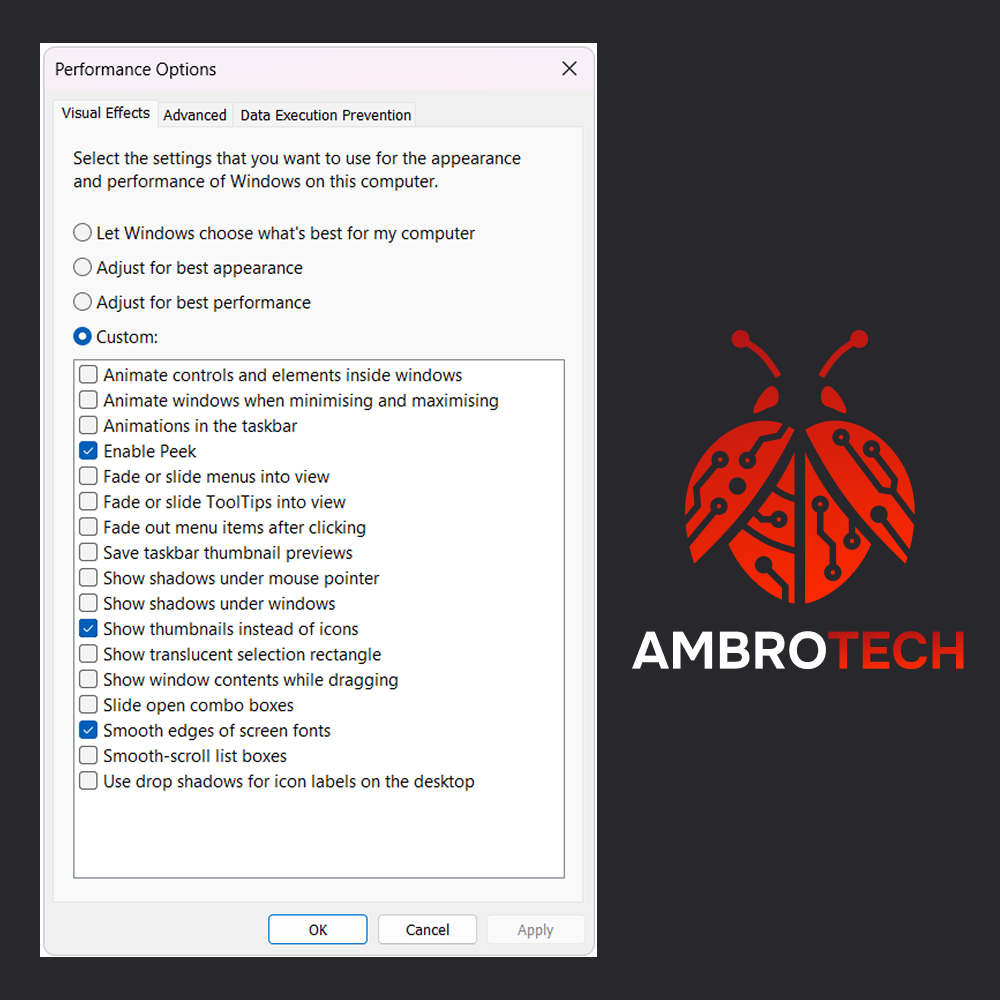
Search for “Adjust the appearance and performance of Windows” in your Windows search menu and open it – you’ll see a long list of tickboxes like the ones below and each of these is a fancy feature to make your experience look better. Things like shadows behind your windows, smooth transitions and animations etc.
Sounds lovely right? Sure but here’s the thing… it also slows your computer down my a certain amount. If you have a tidy standard business laptop/PC then you’re not going to notice the difference but for those of you who are due for a computer upgrade soon, disabling some of these settings will squeeze the best performance out of what you have!
Take a look at this photo to see what settings I have on my own work laptop and see if you can get the best out of what you have because that’s what AmbroTech is all about.
Making more value of your existing IT setup.